WakeUp
An alarm that does more than ring. WakeUp forces your brain and body to engage before the alarm can be dismissed — then checks that you stay awake a few minutes later.
Stop snoozing. Start actually waking up.
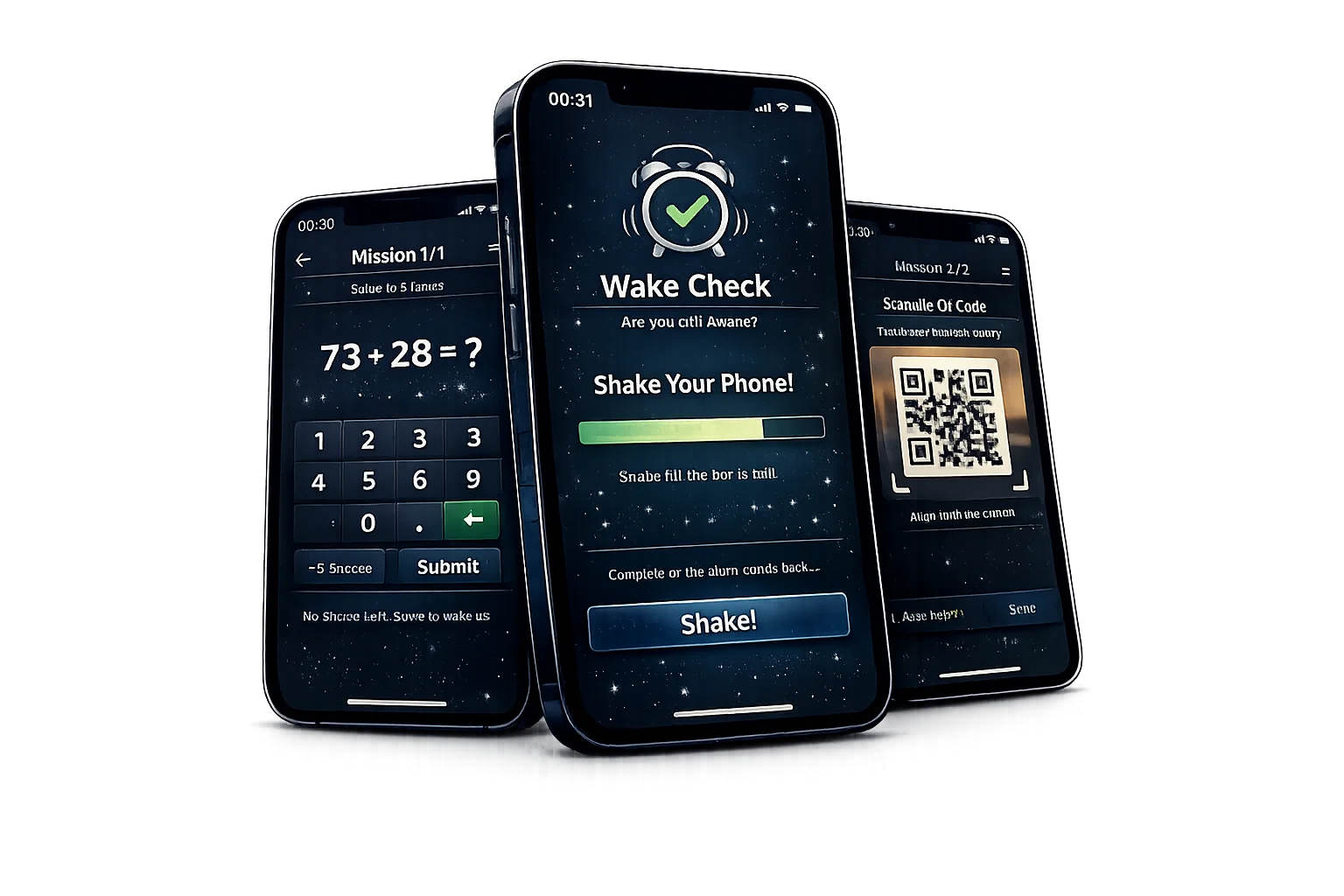
then fall back into bed
and a wake check a few minutes later
Most alarm apps wake your body — but your brain stays asleep.
That is why people tap snooze or dismiss the alarm without even remembering it. WakeUp is designed to break that autopilot state with short cognitive and physical tasks, then confirm you are still awake a few minutes later.
Alarm rings → mission chain → wake check
WakeUp follows a simple formula: make the user engage, move, and think before the alarm ends — then verify that they did not crawl back into bed right away.
Alarm starts
The full-screen alarm view appears and the user must actively respond instead of passively snoozing.
Complete missions
Math, shake, QR, memory, photo, or typing tasks force immediate attention and disrupt the snooze reflex.
Break autopilot
Some tasks require movement or real-world interaction, making it much harder to turn the alarm off and go straight back to sleep.
Wake check later
A few minutes later, WakeUp can ask again: are you still awake? If not, the alarm returns.
Built to make waking up difficult to fake
WakeUp combines alarm scheduling, missions, anti-snooze rules, wake-check logic, and morning statistics into one system designed for people who keep losing to the snooze button.
Mission-based dismissal
The alarm is not dismissed with one sleepy tap. Users must complete one or more short missions first.
Cognitive and physical tasks
Math, memory, shake, QR scan, and real-world tasks are designed to break automatic half-awake behavior.
Wake check follow-up
WakeUp can verify you are still awake three to five minutes later, not just awake for one second.
Smart anti-snooze escalation
WakeUp can limit snooze, raise difficulty after failed attempts, and support a stricter hardcore mode.
Morning statistics
Track streaks, wake-up performance, mission completion, and how often snooze still tries to win.
Built for iOS alarm constraints
The product is designed around real iOS limitations: notification budgets, force-close behavior, silent mode, and App Review rules.
Who WakeUp is made for
This product is designed for people who know a normal alarm is not enough anymore — especially those who snooze on autopilot, struggle with sleep inertia, or keep waking up late despite good intentions.
Heavy sleepers
People who sleep through simple alarms or dismiss them without even forming a memory of it.
Chronic snoozers
Users who hit snooze several times every morning and want a system that fights back intelligently.
Students and professionals
People with deadlines, lectures, commuting, or morning routines that cannot depend on luck.
People with sleep inertia
WakeUp is designed specifically for that foggy state when the body is moving but the brain is still offline.
Habit builders
Users who want streaks, measurable progress, and better mornings over time instead of chaos every day.
Anyone tired of being late
WakeUp is for users who no longer want their first decision of the day to be another accidental snooze.
WakeUp attacks the real reason people snooze
It does not rely on louder sounds alone. Instead, it forces attention, movement, and decision-making — the exact combination that helps break sleep inertia and stop half-asleep reflex behavior.
Missions interrupt the sleepy autopilot loop before the user can casually dismiss the alarm.
Movement-based tasks make it physically harder to stay in bed and easier to transition into a real wake state.
Wake Check solves the hidden problem: waking up for 20 seconds is not the same as staying awake.
Escalating anti-snooze rules help the app become stricter exactly when the user proves they need it.
Frequently Asked Questions
App Store support pages
WakeUp includes the core App Store support pages: Privacy Policy, Terms of Service, Subscription Terms, Support, and Reliability & Permissions.
Want to stop losing every morning to the snooze button?
Follow WakeUp as it moves from MVP alarm flow into a stronger anti-snooze system with mission chains, wake checks, statistics, and premium morning discipline tools.
Get Launch UpdatesStay in Touch
Want launch updates, early access news, or to ask a question about WakeUp? Send a message.

WakeUp is being built as a practical anti-snooze product with transparent reliability expectations, clear iOS limitation notes, and support pages suitable for App Store review.